How to use the pH Monitor
Log your pH from CO₂-on to lights-on and watch your dissolved CO₂ build in real time. This guide walks through setup, what each column means, how to read the status badges, and what to expect from a typical session.
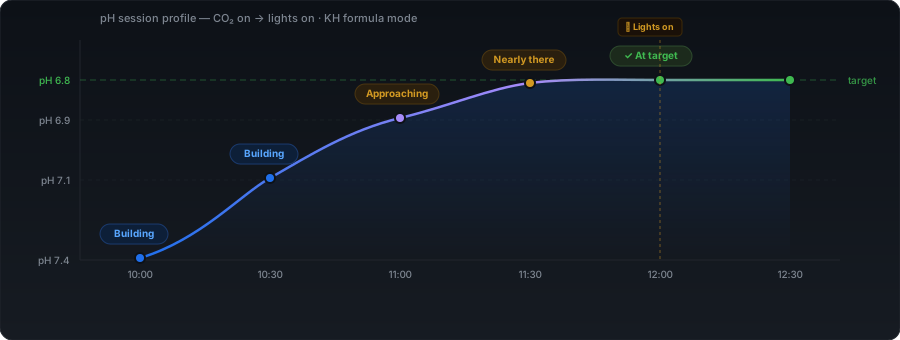
Planted aquariums need dissolved CO₂ to drive plant growth, but the margin between effective and dangerous is narrow. Too little and plants stagnate; too much and fish show stress, gulp at the surface, or worse. The problem is that you cannot measure dissolved CO₂ directly with a consumer test kit. What you can measure is pH — and where your alkalinity is genuinely carbonate-based and your probe is calibrated, pH tracks CO₂ closely enough that logging it at intervals gives you a dependable picture of the water column. Those two conditions matter, and this guide explains what to do when they do not hold.
The AquaCalc pH Monitor turns that log into a live dashboard. Every reading you enter triggers a CO₂ estimate, a progress bar, and a colour-coded status badge. By the time your lights come on you have a complete record of the session — one you can share, review, and compare to future sessions to dial in your needle valve.
Step 1 — Set up your tank profile
Before you log a single reading, fill in the Tank inputs panel, the full-width grid below the reading log. These values are saved to your profile automatically and carried into every calculation. A few of them — the CO₂ safety limit, the probe calibration offset, filter volume and flow rates — live in the collapsible Advanced & equipment panel just beneath it. If this is your first tank, the setup wizard walks you through all of this and even picks the calculation mode for you based on your substrate:
- KH (dKH) — your carbonate hardness. The KH/pH formula uses this to convert pH into a dissolved CO₂ figure. If you use aquasoil and don't know your KH reliably, use pH drop mode instead (see below).
- Tank volume — used by the dosing and water change calculators; not directly needed for CO₂ logging but worth filling in now.
- Target CO₂ (ppm) — typically 20–30 ppm for a planted tank. This is what the progress bar and status badges count toward.
- CO₂ safety limit (ppm) — the level at which the tool fires a red DANGER alert. You set it yourself: the default is 40 ppm and you can set anything from 20 to 60. Lower it if your stock is sensitive. Be aware that 40 ppm is a hobby convention rather than a hard scientific threshold — real tolerance varies by species and depends heavily on dissolved oxygen, because low O₂ makes any given CO₂ level considerably more dangerous. Treat your fish's behaviour, especially gasping at the surface, as a better real-time warning than any ppm figure. This field sits in the collapsible Advanced & equipment panel.
- Temperature — affects the CO₂ equilibrium. The KH/pH formula is temperature-sensitive; the same pH and KH at 24°C versus 28°C represent slightly different actual CO₂ levels. AquaCalc applies a temperature correction to the formula (it shifts the carbonic-acid pK₁ with temperature), so your CO₂ figure is correctly temperature-compensated across the normal aquarium range of roughly 15–35°C — most calculators skip this. It is a small correction, though, and it does not rescue the formula if your KH is not carbonate-based.
Calibrating your probe
If you know your pH probe or pen reads consistently high or low, put the difference in the pH calibration offset field in the Advanced & equipment panel. You can enter anything from −0.5 to +0.5, and it is applied to every reading before any calculation — your overnight baseline and each logged value alike.
Which mode you use changes how much this matters. In KH formula mode the offset shifts your absolute CO₂ figure directly, because the calculation depends on the true pH — a probe reading 0.2 low will overstate your CO₂ substantially. In pH drop mode it very largely cancels out, because the offset moves your baseline and your current reading by the same amount and the method only cares about the difference between them. Either way, a probe calibrated against fresh reference solutions beats any offset you type in.
Step 2 — Log your overnight pH first
The single most important reading of any session is the one you take before CO₂ turns on — ideally first thing in the morning before lights come on, after the CO₂ has been off all night. This is your baseline. The tool labels the first row CO₂ on and uses that pH as the reference point for everything that follows.
"Your overnight pH is the anchor for the whole session. A stable overnight pH — the same reading morning after morning — tells you your baseline is steady, which is what makes each day's readings comparable."
If you use the pH drop method (for aquasoil tanks where KH is unreliable), this overnight reading is even more critical: the entire CO₂ estimate is derived from how far pH has dropped from that baseline.
Step 3 — Generate the log table
At the top of the pH reading log, set three things:
- CO₂ on at — the time you switch your CO₂ on (or your solenoid opens). The table generates time slots from this point forward.
- Interval — 15, 30, or 60 minutes between readings. 30 minutes is the most common choice; it gives you enough resolution to see the curve without requiring you to be at the tank constantly.
- Slots — how many rows to generate. 8 slots at 30-minute intervals covers 4 hours, which is enough for a CO₂-on-to-lights-on window in most setups.
Hit Generate. The table fills with empty rows, each labelled with a time. The first row defaults to CO₂ on; you can change any row's event type using the dropdown.
What to enter and when
At each interval, check your pH meter and type the reading into the row for that time. Press Tab to move to the next row — the cursor jumps automatically. The row calculates immediately: you'll see the estimated CO₂, the pH drop from baseline, the progress bar, and the status badge update as you type.
You don't need to enter every row. If you miss a slot, leave it blank — the tool skips blank rows, and because every row's drop is measured against your baseline rather than the row above it, a gap does not distort the numbers that follow.
Marking events
Use the Event dropdown on any row to mark what happened at that point in the session. Options:
- CO₂ on — the first row; CO₂ entering the water.
- pH reading — a standard interval reading with nothing notable happening.
- Lights on — mark the row where your lights come on. Plants begin consuming CO₂ immediately; you'll often see the pH drop slow or reverse from this point.
- CO₂ off — mark when your solenoid closes. Useful if your CO₂ turns off before lights-out and you want to track the recovery curve.
- Lights off — end of the photoperiod.
The CO₂ curve — what to expect
A typical planted tank CO₂ session follows a predictable curve, and understanding its shape helps you interpret the readings rather than just recording numbers. One important note before you start: a gradual rise from 20 ppm at lights-on to 30 ppm mid-session is normal and healthy — it is not instability. Our CO₂ stability guide explains what the science says about what "stable" actually means and what genuinely causes algae problems.
When CO₂ first turns on, dissolved levels are at their overnight floor — typically a few ppm rather than zero. Water in equilibrium with air holds only about 0.5–1 ppm, but a stocked, planted tank sits above that overnight because fish, plants and bacteria all respire in the dark. The gas dissolves quickly into the water column and pH drops at its fastest rate in the first 30–60 minutes. This is the Building phase.
As dissolved CO₂ climbs, the rate of dissolution slows. The water becomes increasingly saturated and the equilibrium between CO₂ entering via the diffuser and CO₂ escaping at the surface begins to balance out. The pH drop that looked dramatic in the first hour flattens to a gentle slope. This is the Approaching phase — the curve is still heading in the right direction, just more slowly.
"CO₂ does not build linearly. The first hour looks dramatic; the second hour looks flat. If you only see fast drops you're still in early build-up. If the drops have slowed to a crawl, you're close to your equilibrium point."
Once you hit target, CO₂ levels stabilise. The needle valve is holding a steady flow and the water is at saturation for that flow rate. This is At target — the badge turns green and holds there as long as your CO₂ supply and agitation are consistent.
When lights come on, plants begin photosynthesising and consuming CO₂ directly. You'll typically see pH stop falling or even tick up slightly in the first few readings after lights-on. This is normal — the plants are helping maintain CO₂ levels by using what's dissolved. In a heavily planted tank with strong light, the consumption can be significant enough to require a higher CO₂ flow rate to maintain target levels through the photoperiod.
Reading the status badges
Every row shows a status badge that tells you where you are relative to your target. For the KH formula mode:
- Building — CO₂ is rising but still well below target. Normal for the first 30–60 minutes.
- Approaching — past 70% of target. Getting close; start watching more carefully.
- ✓ At target — between 95% and 100% of your target CO₂. This is where you want to be through the photoperiod. Note it is a one-sided band: anything above your target reads as Over target, not “at target”.
- Over target — CO₂ has exceeded your target ppm. Consider easing the needle valve slightly.
- DANGER >your limit — CO₂ has exceeded the safety limit you set. The badge shows your own figure, so if you set 30 ppm it reads “DANGER >30ppm”. Fish may be stressed. Turn down CO₂ and increase surface agitation immediately.
In pH drop mode, the danger alert works the same way, but the build-up progression is more granular and uses its own labels: Starting → Building → Climbing → Nearly there → ✓ At target → Over target → DANGER. (Over target here means the drop has gone about 15% past your target drop, giving a little headroom before it flags.)
KH formula vs pH drop — which to use
The tool offers two calculation modes. The switch is the Calculation mode bar right at the top of the pH Monitor tab, above everything else:
KH / pH formula
Uses the standard carbonate chemistry equation to convert your KH and measured pH into a dissolved CO₂ figure in ppm. This is the most accurate method when your KH is stable and reliably measured. It works well with hard tap water and gives you an absolute CO₂ reading at every time slot. Here is the equation, in the form most aquarists will recognise:
CO₂ (ppm) = dKH × 3 × 10(7 − pH)
AquaCalc uses the equivalent form dKH × 13.40 × 10(pK₁ − pH), which produces the same answer at 25 °C but lets us shift the carbonic-acid pK₁ with temperature (by 0.0055 per °C away from 25 °C). That correction is validated across roughly 15–35 °C. For the science behind the formula itself, see the KH, CO₂ and pH guide.
What breaks it. The equation assumes your alkalinity is carbonate alkalinity. Anything else that buffers your water inflates the KH reading and makes the CO₂ figure wrong — usually too high. The common culprits are aquasoil and other CEC substrates, which absorb and release ions so KH drifts week to week; phosphate buffers, including many pH-adjusting products; and tannins and humic acids from wood and leaf litter. A drifting or drifting-uncalibrated pH probe does the same. If any of those apply to your tank, use the pH drop method instead. The substrate CEC article explains the substrate case in detail.
Worth keeping in perspective: the temperature correction removes one small error (a few percent across normal aquarium temperatures). Non-carbonate alkalinity can be an order of magnitude larger. Getting the method right matters far more than the temperature maths.
pH drop method
Ignores KH entirely and measures CO₂ build-up as a function of how far pH has dropped from your overnight baseline. You set a target pH drop (e.g. 1.0 unit) that corresponds to your target CO₂ level, and the tool tracks progress toward that drop. This method is standard practice for aquasoil tanks where KH cannot be trusted.
One honest caveat: the absolute ppm figure in this mode is an estimate (shown with a “≈”). The formula is:
est. CO₂ ≈ 3 × 10(overnight pH − current pH)
so a 1.0 pH drop works out at about 30 ppm, 0.7 at about 15 ppm. Note the baseline it starts from: 3 ppm is a hobby convention, not a measured constant. It is an allowance for overnight respiration, and it is several times higher than true air equilibrium. If your tank's real overnight baseline is 1 ppm rather than 3, every ppm figure in this mode is roughly three times too high. What that error does not affect is your progress toward your target drop, because both the baseline and the reading move together. So treat the trend and the pH drop achieved as the reliable signal, and the exact ppm as a rough guide. (This mode uses your overnight reading as the baseline, not the shaken degassed sample — the degassed field is hidden here.)
pH reading alerts
Once you have generated a log table, the 🔔 Alerts off button appears in the log controls (desktop only). Click it to switch alerts on — the button turns green and shows 🔔 Alerts on. From that point, the tool fires a browser notification at each scheduled reading time, so you don't need to watch the clock.
A countdown display appears showing exactly how long until the next unfilled reading slot is due. When the time arrives and you haven't yet entered a reading, a banner fires at the top of the log. Alerts skip any slot where you've already entered a reading.
You will need to grant notification permission the first time you enable alerts — your browser will prompt you. Alerts only fire while the tab is open; they are not push notifications.
Analyse curve — CO₂ profile report
Once you have readings logged, a ✶ Analyse curve button appears alongside the Share button. Clicking it generates a full analysis of your CO₂ session — grounded in the same science as the CO₂ stability guide.
The report opens as a modal and shows:
- The CO₂ curve — a snapshot of your session chart trimmed to the readings you have entered, so you can see the shape of the session alongside the findings.
- Overall verdict — one of five ratings: Excellent, Good, Needs work, Poor, or Critical. Each comes with a plain-English summary of what that means for your plants.
- Session stats — peak CO₂, CO₂ at lights-on (if you have marked that event), session average, and the percentage of readings at or above the 20 ppm effective floor for plant photosynthesis.
- Findings — individual observations about your curve, each colour-coded by severity. Green findings are things going right; amber findings are issues worth addressing; red findings are problems that need immediate attention. Each finding that requires action includes a specific suggested fix.
The analysis checks for: mid-session crashes (sharp CO₂ drops between readings), danger levels exceeded, CO₂ critically or chronically low, CO₂ still low at lights-on, target not reached, an oscillating or unstable profile, CO₂ declining after peak, and whether the session spent meaningful time in the effective range.
Your readings save automatically
Every pH value you type is saved as you go, so if you accidentally close the tab or reload the page your readings are still there. By default a profile belongs to the device you created it on. To pick the same session up on your phone you have two options: sign in to a free AquaCalc account, after which your tanks sync automatically across every device you use, or use the Sync Devices tab to move them across with a link or QR code without an account.
Profiles are identified by an anonymous ID stored in your browser — no account is required to use any of this, no email address is needed, and nothing that identifies you is collected. An account is optional and does one thing: it links your devices so the same tanks appear on all of them.
Sharing your session
Once you have readings logged, the ↗ Share session button appears in the log controls. Click it and AquaCalc generates a unique link to a branded page showing your full session: pH and CO₂ charts, a colour-coded readings table with all your event markers, and your tank parameters. The link is valid for 90 days.
Paste it into a forum thread to get feedback on your CO₂ curve, share it with a friend who's setting up their first pressurised system, or just keep it as a record of a dialled-in session.
Backing up and restoring your profile
Your profile is stored on AquaCalc's server and tied to your browser. If you want a local backup — or you're switching to a new device or browser — open the Manage menu in the profile bar at the top of the dashboard and choose ↓ Export backup. This downloads your entire profile as a .json file: all tank settings, RO mixer parameters, dosing preferences and any saved pH readings.
To restore it, choose ↑ Import backup from the same menu and select the file. AquaCalc loads the profile immediately and saves it to the server. If a profile with that name already exists you'll be asked whether to overwrite it or keep both.
Light and dark mode
My Tank is dark by default, which suits a dimly-lit tank room and long logging sessions. If you would rather read it light, use the sun/moon toggle at the right-hand end of the profile bar. Your choice is remembered on that device, and the charts, tables and status colours all follow it.